Say Goodbye to Meta Ads Manager: Publish & Manage Campaigns Directly Inside Stirling
From product link to live Meta campaign in a few clicks—without ever touching a clunky third-party dashboard.

Every e-commerce founder and marketer knows the feeling: you’ve built high-converting ad creative, and now comes the hard part—navigating Meta Ads Manager. Between endless loading screens, buried settings, and accidental misclicks, turning a great ad into a live campaign often feels like wrestling with a giant spreadsheet.
Not anymore.
Today, we are thrilled to announce that Stirling is officially taking over the "last mile" of your advertising workflow. You can now publish and manage your ad campaigns directly from Stirling straight to Facebook and Instagram.
Here is everything you need to know about taking your ads from concept to live campaign in seconds.
How It Works: 1-Click Launching
Setting up your campaign in Stirling is designed to be completely frictionless. You don't need a complex media-buying setup or a steep learning curve.
All you need to get started is:
An active Stirling account (available on our premium plans).
A Facebook Business Page linked to an active Meta Ad Account.
Once your account is connected in your Stirling settings, launching a campaign takes just a few clicks. Simply select your top-performing generated creative, set your parameters, and hit Publish. Your ads go live instantly—no manual downloading, no asset re-uploading, and zero wasted time.
Your New Ad Command Center
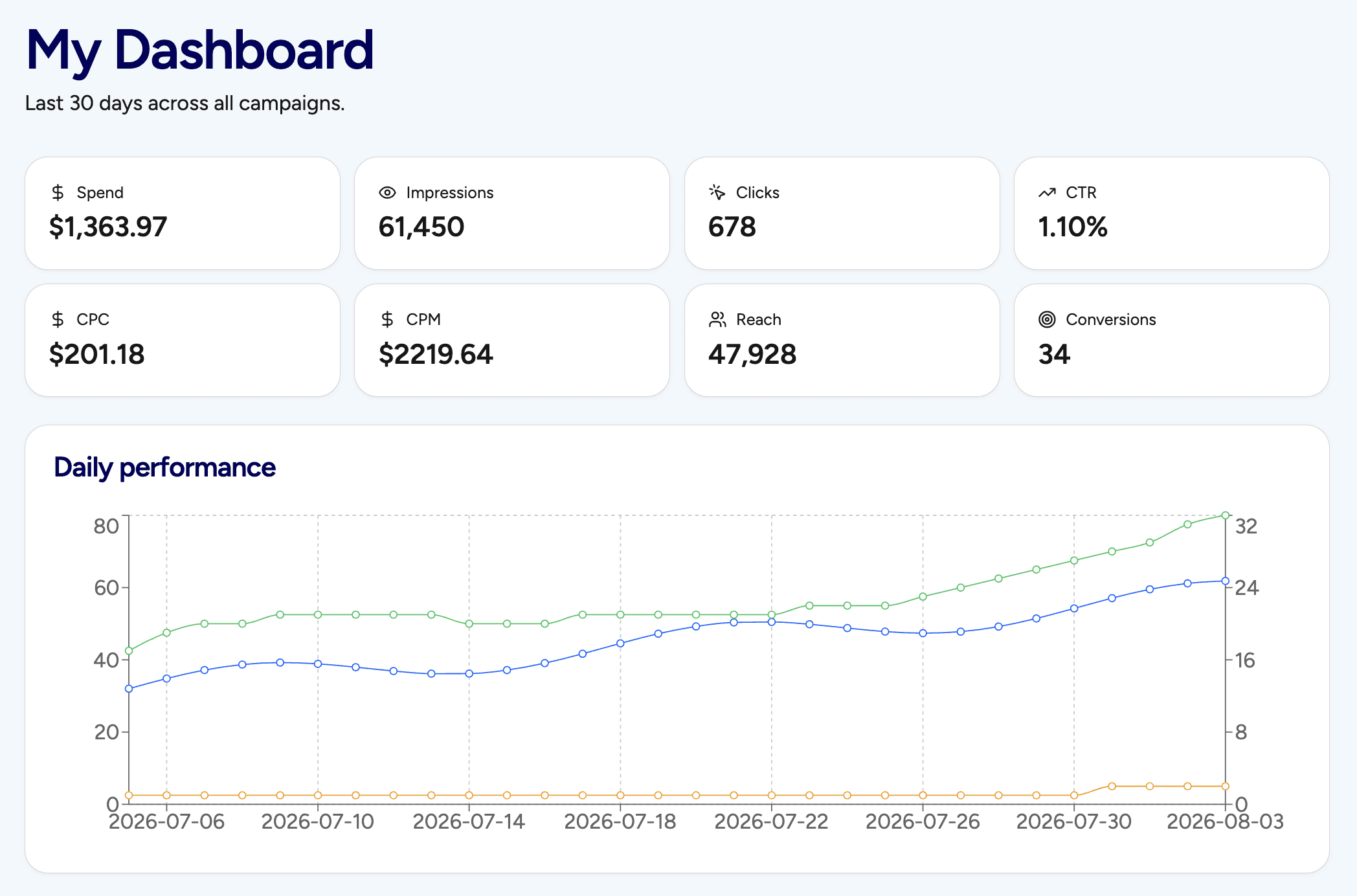
Publishing is only half the battle; managing your budget and performance is where the real work happens. That’s why we also built a brand-new Stirling Ad Dashboard to keep you in total control of your marketing dollars.
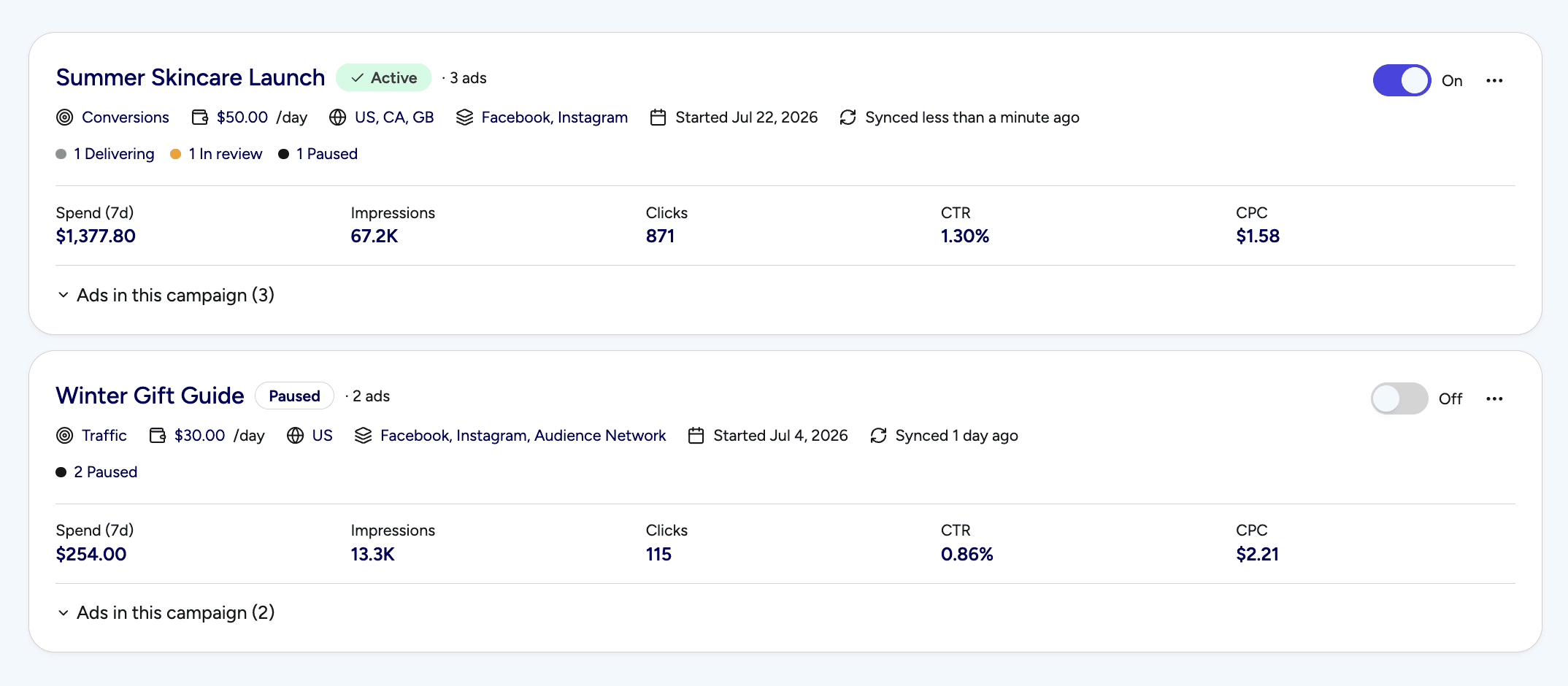
Inside your Stirling dashboard, you get clear, high-level access to the vital metrics that actually matter to your business.
1. Total Campaign Control
Need to pivot your strategy mid-campaign? You can edit, adjust, or completely rethink your ad setups on the fly.
Tweak Budgets: Scale up what's working or pull back spend in seconds.
Adjust Targeting: Refine your audience demographics without digging through nested Meta menus.
Control Campaign Length: Set start/end dates or pause campaigns whenever you need to take a breather.
2. Trim the Fat (And Keep the Winners)
Not every creative hook performs the same, and the secret to high ROAS is cutting your losers quickly.
Inside Stirling, you can view your creative performance at the granular ad level. With a single click, you can pause or delete individual ads that aren't performing, leaving only your top "winning" creative running.
Why This Changes the Game
By moving the campaign launch and management process inside Stirling, you stop viewing ad creation as a "chore" and start treating it as a fast, repeatable science.
No more tab switching: Keep your creative generation, copy, and campaign deployment under one roof.
Faster testing: Test 3 to 12 different ad hooks in the time it usually takes to set up a single ad set in Meta.
Zero friction: Spend your energy scaling your brand, not fighting user interfaces.
Ready to Skip Meta Ads Manager?
This feature is live right now for all Stirling premium subscribers.
Head over to your account dashboard, connect your Facebook Ads account, and launch your next winning campaign before your morning coffee gets cold.

Turn Your Product Link Into 12 Winning Ads
Just paste your URL. Stirling’s AI reads your site, finds your best hooks, and builds high-converting ads in 60 seconds.